

These dazzling duos are the definition of relationship goals.
Updated Jan 21, 2025Creating a Wedding Invitation With a QR Code Isn’t Rocket Science
Let tech make your life easier.

Photo: The Knot Invitations

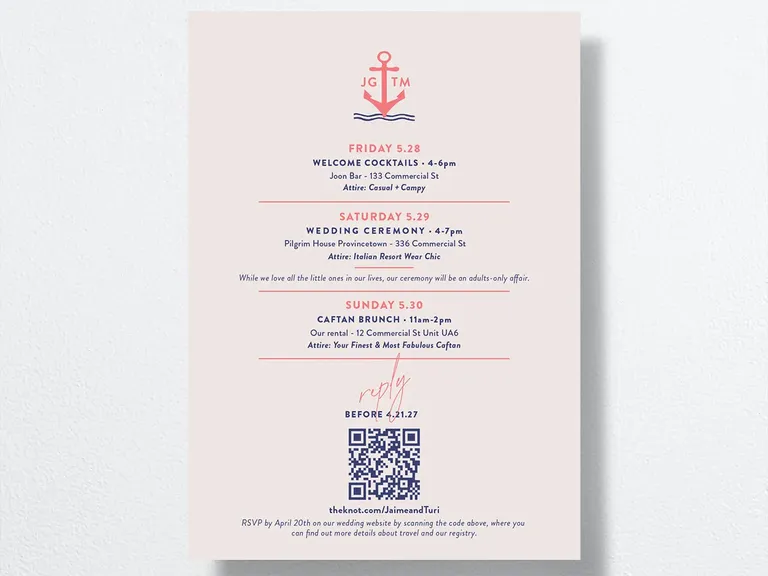
If you've done your research, you probably already know what's included in a wedding invitation suite and the other stationery items you'll need for your affair. But did you know you can have a wedding invitation with a QR code to share info with your guests? For those unfamiliar with the term, a QR code (short for quick response code) is a barcode that can be read through a smart device's camera and leads to a website. This small technical advancement has been used more by to-be-weds every year. According to data found in an internal study, last year 49% of couples included a QR code on their save-the-dates or invitations so guests can RSVP or visit their wedding website compared to 38% in 2023 and 20% in 2022.
Wondering what all the hype is about? Continue reading to learn how to get a QR code for The Knot Invitations, collect RSVPs, the benefits wedding invitations with a QR code have and the other ways you can utilize this technology. Get ready to feel like a tech genius in a few easy steps.
In this article: Can You Put a QR Code on a Wedding Invitation? | How to Generate a QR Code for a Wedding Invitation | How to Use a QR Code for Wedding RSVPs | Benefits of Using a QR Code on Your Wedding Invitations | Additional QR Code Uses for a Wedding
Can You Put a QR Code on a Wedding Invitation?
Yes, you can add a QR code to your wedding invitation, welcome signs, menus, RSVPs and much more. For your wedding invitations, we recommend adding the QR code to the back so the front doesn't look cluttered.
How to Generate a QR Code for a Wedding Invitation
Wedding invites with a QR code aren't a new stationery trend, but they're definitely gaining popularity. Learn how to use a QR code generator for wedding invitations on The Knot below. You can also follow this process for your save-the-dates, RSVPs, menus and more.
FEATURED VIDEO FROM THE KNOT
- Go to TheKnot.com/paper and click the "Invitations" tab.
- Browse The Knot Invitations to see dozens of beautiful options and select your invitation template. Please note: QR codes are free with all stationery products.
- Once you determine your preferred format, design color, paper type and quantity, click the "Personalize" button.
- You'll be taken to a page where you can completely customize your invitation, from the background image to the font size. Decide on your QR placement and add it to the front or back of your template by pressing the "Front" or "Back" tabs in the top-middle section of the page.
- To input the URL, click the QR code icon on the left of the template. You'll now be able to add any website (ensure the site works before adding it to your stationery). We suggest creating a wedding website QR code so guests can navigate to your page easily.
- Once you've added your URL, click "Insert." Your QR code will automatically generate and drive to your unique details.
- On the top-right section of the page, click "Save" if you want to continue personalizing your invitation later or "Next: Review" if you want to do a final approval of your invitation and add it to your shopping cart.
How to Use a QR Code for Wedding RSVPs
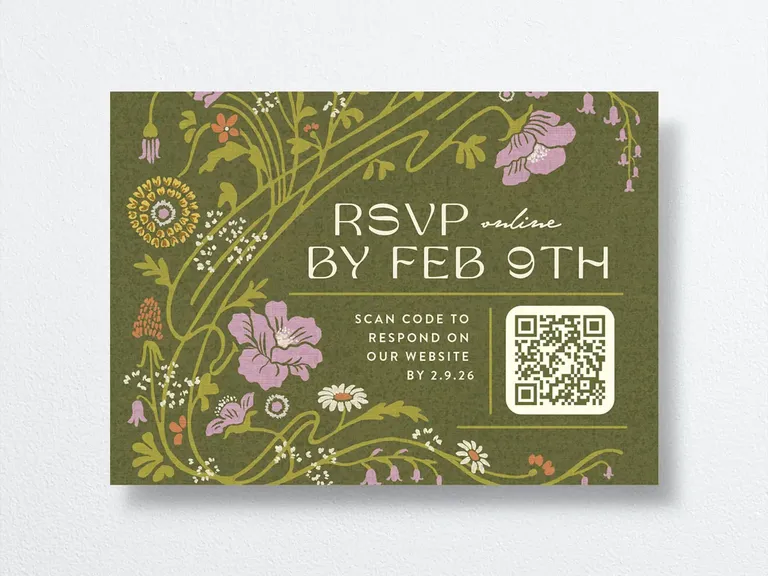
RSVP cards are one of the items included in a wedding invitation suite, which means they're the perfect place to add an RSVP QR code. Gather your RSVPs online seamlessly with the simple steps below using The Knot Invitations.
- Following the steps above, insert your wedding website link on your RSVP cards.
- Once you add your wedding website, guests will be able to use their smart device's camera to scan the QR code on your stationery.
- The QR code will take them directly to your site, where they can click the "RSVP" tab.
- Guests will then be requested to type in their full name to find their invitation and eventually submit their RSVP response.
- Since The Knot has a helpful Guest List Manager tool, you'll get an email notification once a guest completes the RSVP process. Your online guest list will automatically update and collect everyone's answers in real time.
Benefits of Using a QR Code on Your Wedding Invitations
All-in-one wedding invitations with a QR code seem cool, but you might still be wondering why they're important, especially since you can add the URL link to your stationery. Keep reading to learn some of the benefits you'll enjoy if you put QR codes on your invitations.
You Can Link Your Wedding Website
When it's time to add a URL, input the address to your wedding website for your QR code to lead to. Sharing your wedding website via QR code allows guests to easily access all of that useful wedding website info with a single click. Think: registry information, wedding accommodations, local recommendations and much more. Instead of including your link on your invitations, which can sometimes be too long and look clunky, add a small QR code for your wedding website.
Let Guests RSVP With Ease
Your guests will be impressed when they see a QR code RSVP wedding invitation in the mail. Your loved ones can simply scan the code with their phones and be taken directly to your RSVP details. You might have to spread the word about how to use the QR code to your older guests, but otherwise, it's a straightforward process. Just sit back and watch the responses roll in.
FOR YOU

Where to Find Printable Wedding Invitation Templates
Looking to save on stationery? Here are our favorite picks.
Our Guide to Wax Seals on Wedding Invitations
Signed, sealed, delivered—emphasis on the sealed part.

15 Clearly Stunning Etsy Acrylic Wedding Invitations
Full transparency: Forget the fridge, these fancy invites deserve a top-shelf display.
Save Time, Money and Paper
Including a QR code will also save you time on designing another piece of stationery, and your guests won't have to write on a response card and send it in the mail. In addition, you can feel happy about doing your part for the planet by opting for digital RSVPs instead of paper ones. Plus, you'll save some cash because you're not paying for printing, postage and envelope expenses. Use those savings to pay for other wedding items you really want.
If you'd like to still mail your RSVPs, you can use a QR code too. Simply include the QR code on your paper RSVPs to provide more wedding information to your guests.
Additional QR Code Uses for a Wedding
A QR code wedding invitation isn't the only way to use this convenient tech. Below are four other stationery options, if you're feeling adventurous and creative.
Receive Wedding Pictures From Guests
Yes, you'll get amazing photos from your professional photographer, but collecting the candid and fun pictures your guests take is always a good idea. Create an image folder, then link it to a QR code labeled "wedding photos." Then all you have to do is add the QR code for wedding pictures to your table numbers for everyone to use.
Level Up Your Wedding Cocktail and Food Menus
On The Knot Invitations, you can add a wedding QR code to any menu, cocktail napkin or coaster. We think this is a great idea for two reasons: Number one, the QR code can include an ingredients and allergens list, which might not fit or look aesthetically pleasing on a menu. Number two, you can add cute fun facts about you and your partner if a drink or food item on your menu has special meaning to your relationship. For example, if you're serving ranch water cocktails because you and your fiancé first met at a ranch, add that to a document full of fun facts and link to it from your QR code.
Add Helpful Info to Your Wedding Programs and Signs
There are many creative ways you can include your QR code on your programs and signs. Share your wedding ceremony playlist with your guests so they can save it to their favorite music streaming platform or give a detailed breakdown of the wedding ceremony traditions. You can even add a QR that links to an updated itinerary to address any last-minute changes to the schedule. No matter why you need it, there are numerous ways to put your wedding QR code to use.
Surprise Your Guests With Modern Thank-You Notes
We love handwritten stationery, but why not upgrade your thank-you notes by adding a QR code? Record a personal thank-you video for your guests that they can cherish for years to come. We think this a sweet and imaginative way to show your appreciation for those who helped you celebrate your special day.


